

 Ethan Parker
June 25, 2026
Ethan Parker
June 25, 2026
How Do I Check My Google Ranking For Free?
Putting time or money into Search Engine Optimization without measuring the results of that work does not make much sense.…
Putting time or money into Search Engine Optimization without measuring the results of that work does not make much sense. Among all the metrics that help explain your SEO performance, keyword search rankings usually stay top of mind for most website owners. These rankings directly reflect how well your site aligns with the actual words your audience types into the search bar.
Here comes a small dose of SEO tough love. Most businesses do not rank for the keywords they think they rank for, or even the ones they hope to rank for. Unless you have already put serious effort into your SEO, chances are high that you are not ranking well either, and that situation equates to money left sitting on the table. If you never learn how to check your Google rankings, you will never be able to improve them, so let us walk through the process together.
You do not need expensive subscriptions or advanced technical abilities to get this work done, which should come as a relief. The free SEO tools and simple methods described below will let you research the keywords your website already performs for, and you can take that information to focus your future SEO efforts without second guessing yourself.
Why Is It Important To Check Your Google Rankings?
The first organic result on Google gets 27.6% of all clicks, while the second result gets only 15.8%, and the tenth result earns just 2.4%. If your website sits on page two of the search results, it becomes practically invisible to most users.
Google search rankings are dynamic and unpredictable, so you cannot afford to be passive or “set it and forget it” with your SEO strategy.
Google frequently changes its algorithm (through core updates and spam updates). Your competitors are actively monitoring these changes and adjusting their strategies. User search behavior (keywords and phrases) also shifts over time.
To stay competitive in Google search, you must continuously monitor, adapt, and update your SEO strategy, just like your competitors do.
If you don’t regularly monitor your search rankings, you risk losing search engine results pages (SERPs) rankings and, consequently, traffic. That’s why it’s so important to regularly check your Google rankings to make adjustments to your SEO strategy.
4 Ways To Check Your Rankings
Here are four low tech and low cost methods to check your keyword rankings without spending anything.
1. Checking Google Ranking Manually
When checking rankings manually, the process involves several distinct steps:
- Open Incognito Mode in your browser, to avoid personalized search results influenced by browsing history;
- Enter your target keyword in Google search bar.
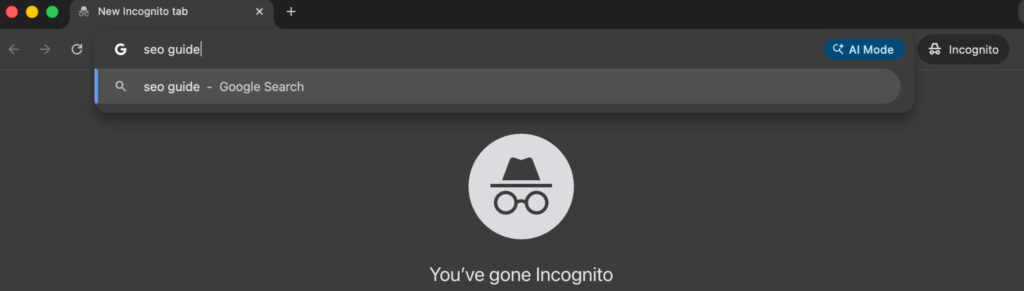
However, even then, Google may still deliver localized search results based on geographic relevance. The user then focuses on the SERP, specifically scanning results to find their domain among the organic search engine results.
Despite its accessibility, manual searching (as a method) has critical limitations, including:
- Time prohibitive manual searching when dealing with a long list of keywords;
- Difficulty in recording results accurately for later comparison;
- Lack of historical data for tracking keywords over time;
- Inability to scale for frequent checking rankings.
For these reasons, while manual searching can verify a target keyword position occasionally, an SEO tool is far more efficient for ongoing monitoring of keyword rankings.
2. Check a Single Keyword in Ahrefs’ Free Keyword Rank Checker
Use Ahrefs’ Free Keyword Rank Checker to check your rankings for one specific keyword. This tool gives you a clean report showing your rank for any keyword on your domain without paid tiers, hidden fees, or account requirements. It helps you identify fast if you are losing rankings for your target keyword.
To use this tool:
- Head to the Ahrefs’ Free Keyword Rank Checker webpage;
- Enter your domain name and the keyword you want to check;
- Run the search.
You will get a clear and objective ranking for this keyword.
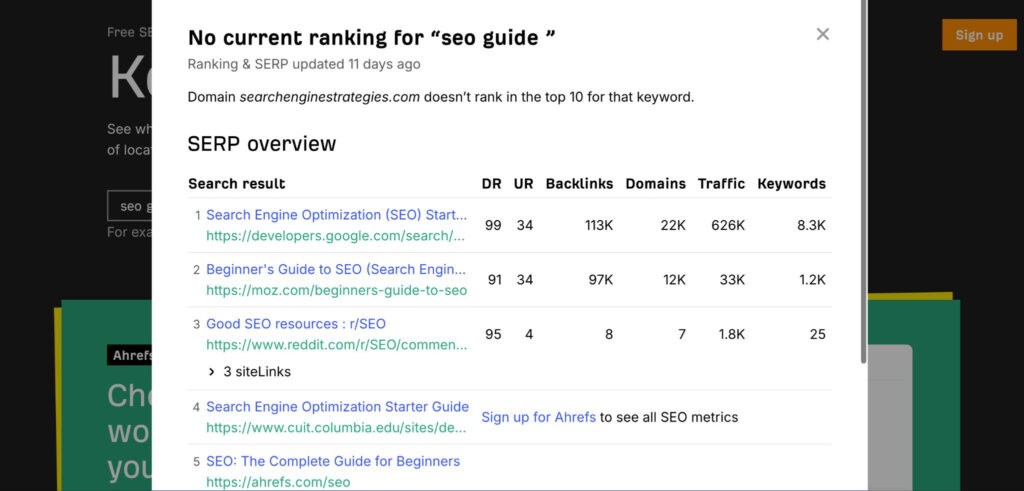
This tool avoids search personalization and location tracking, which makes it more reliable than manual checks for finding your true position. You will not get ranking history or bulk keyword tracking, but checking a few specific keywords quickly is something it handles just fine.
3. Check All Keyword Rankings with Ubersuggest
For fast and free checking of all SEO keywords your website ranks for across search engines, use Ubersuggest SEO tool. With Ubersuggest you can easy view a full list of indexed keywords to see what search terms your site appears for, and you can also analyze estimated traffic to get an idea of how much volume each keyword might drive to your pages
Here’s a simple steps to start:
- Go to Ubersuggest and navigate to Competitive Research;
- Then find and click on Keywords By Traffic;
- Enter your website URL in search bar, don’t forget setup your language and country;
- Hit the Search button.
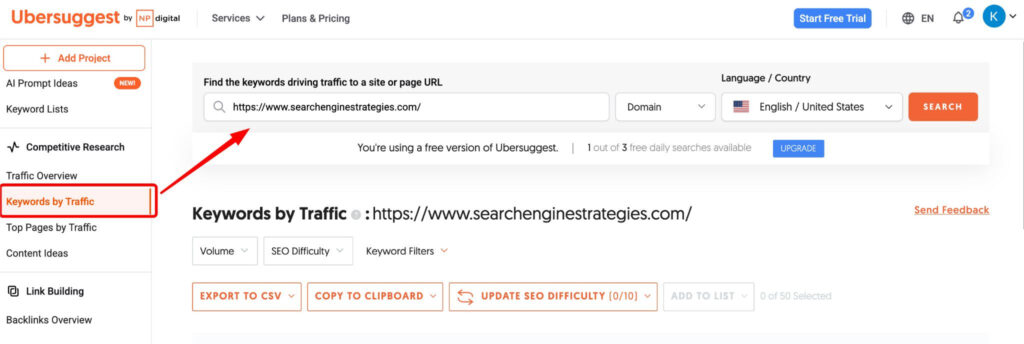
After the tool processes your request, check out the keywords your website ranks for along with their positions and estimated search traffic.
Keep in mind that Ubersuggest has a limit on the number of free searches per day. This may be sufficient for small businesses, but if you need deeper analytics, you might want to consider a paid subscription. Ubersuggest significantly saves time compared to manual check and allows you to check more keywords and positions than Ahrefs Keyword Rank Checker.
However, Ubersuggest has its cons. It lacks data on the actual clicks and traffic your site receives. If you want to know exactly which keywords your site visitors are using and which are generating the most traffic, Google Search Console should be your next stop.
4. Check Traffic Keywords With Google Search Console
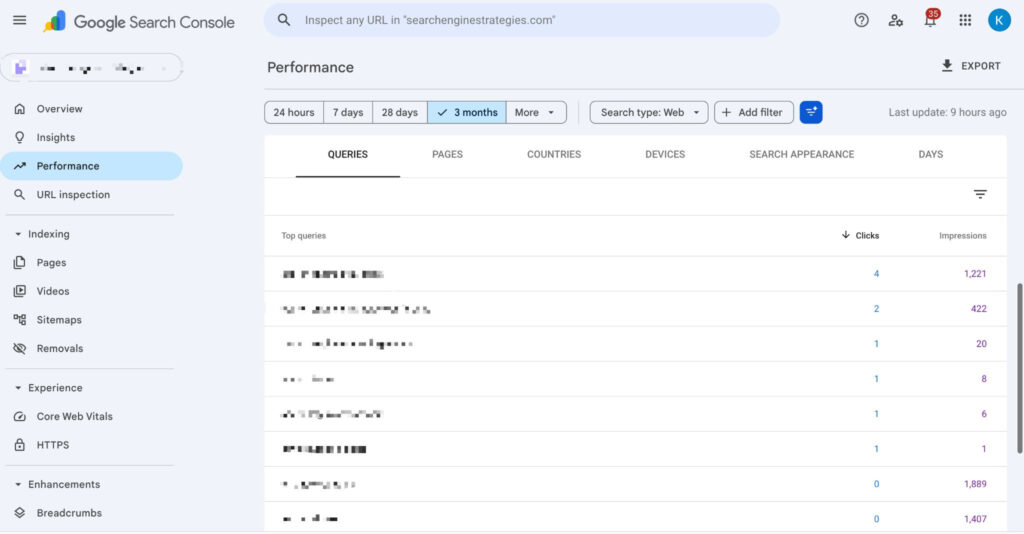
Google Search Console or GSC is a free Google tool that delivers detailed data on the exact keywords people use to find your website, plus performance metrics showing how those keywords behave over time.
With Google Search Console, you gain access to the actual search queries that users enter into Google before landing on your website. You also get data on the number of clicks, impressions, and average SERP position for each keyword your site ranks for.
All this data is incredibly important for assessing the performance of both a specific page on your site and the keywords you’ve optimized for that page.
Before accessing GSC data, you need to:
- Add your site to Google Search Console;
- Go to the “Performance” section, then to “Queries”;
- Use filters to sort queries or pages to see which keywords or queries generate the most clicks and impressions.
Which Free Keyword Ranking Tool Is Right for You?
So how do you choose which tool best suits your needs? Simply put, you need them all for more data sources.
Manual Search should be used when you want to check several keywords that are having ranking issues, as well as when you want to check search results for a specific region or compare search results in several regions or locations. Even with incognito mode enabled, your location and browser history can distort the picture.
Pro tip: Use a separate browser for manual checking to avoid the influence of browser history and a VPN or proxy server to check SERPs in the location you’re interested in.
For a large list of keywords, the manual method is too inconvenient and takes a significant amount of time.
The Ahrefs Keyword Rank Checker tool allows you to check search results for a single keyword for free, without registration. This is useful for quickly analyzing search results and comparing them with manual methods. However, a significant drawback of the Ahrefs Keyword Rank Checker is that it only checks one keyword at a time and does not track ranking changes over time.
Ubersuggest allows you to see the expected keywords your site ranks for, as well as traffic and difficulty metrics, which helps you estimate how much effort you need to spend on improving your site’s keyword rankings.
It’s important to understand that Ubersuggest data is based on third-party estimates, not actual user behavior, and the free version limits the number of search queries per day.
Google Search Console displays the actual search queries people used to find your site, along with related data such as impressions, clicks, and average position information. This allows you to see the real picture of your site and evaluate the effectiveness of your keywords and chosen strategy.
Pro tip: Using Google Search Console and Looker Studio (formerly Google Data Studio) will help you create a dashboard for tracking and analyzing data on keywords, clicks, and more.
Official Google documentation explains how to connect Search Console to Looker Studio for custom visualization.
4 Common Mistakes to Avoid When Checking Rankings
It’s time to look at common mistakes to avoid when checking rankings.
Here are a few common mistakes:
- Trusting estimated traffic as actual clicks;
- Checking your search rankings too frequently;
- Ignoring mobile-first indexing;
- Using only one SEO tool.
Trusting Estimated Traffic
Relying solely on SEO tools is the most common mistake newbies make. Tools like Ubersuggest and Ahrefs use estimated traffic data rather than real click data, which is available in GSC.
Check Search Ranking Too Frequently
Google rankings can fluctuate due to Google updates (core or spam updates), AI Overviews or other factors. Monitoring rankings daily can lead to unnecessary stress and, as a result, incorrect conclusions and actions. For most small businesses, weekly ranking checks are sufficient. When implementing changes to your website, you can check more frequently, every 2–3 days, to evaluate the effectiveness of the changes.
Ignoring Mobile-First Indexing
Ignoring mobile optimization on your website ranks as one of the most serious mistakes you can make. Even if you believe that the majority of your website’s audience is desktop users, Google uses the mobile version of your site when ranking and indexing it using Googlebot-Mobile.
Using Only One SEO Tool
Using only one SEO tool will never give you an objective picture of your rankings. Each tool comes with its own strengths and also its own weaknesses, so no single source tells the whole story.
Only by combining tools like Ahrefs, Google Search Console, and Ubersuggest (or similar) can you accurately evaluate your rankings and overall search performance.
What Matters More Than Your Rankings
Knowing how to check your search engine rankings puts you in control of your SEO. But what do you actually do with that information? That is what decides whether you succeed or fail over the long run.
Maybe you are already ranking exactly where you want to be. Great. Keep watching things and put your energy into holding onto that visibility. Do not get lazy about it.
Maybe you are not ranking where you want to be. Now you know the truth. No more guessing. And knowing means you can finally start fixing the problem.
The real secret is this. Track your keyword rankings, but do not obsess over every small wiggle or daily up and down. SEO never stays still. Your rankings will shift all the time as the search landscape changes around you. What actually counts is watching your long term trends, making smart adjustments based on real data, and constantly updating your website so your audience still finds it relevant and valuable.
Related Posts
Ethan Parker
June 25, 2026
10 Content Optimization Strategies to Increase Rankings, Traffic and AI Citations
Most content fails to rank not because it lacks keywords, but because it doesn’t fully answer the reader’s question, or…
Ethan Parker
February 23, 2026
61 Types Of SEO (Search Engine Optimization) for 2026
Search engine optimization looks nothing like it did a few years back. AI now sits front and center in almost…
Ethan Parker
March 19, 2026
10 Common Technical SEO Issues Killing Your Rankings (And How to Fix Them)
SEO issues often lurk quietly in most websites. They silently sabotage your Google rankings without any warning. One overlooked server…
Ethan Parker
February 26, 2026
What is Off-Page SEO? Definition, Optimization and Strategies
You’ve built a beautiful website. The content is sharp, the keywords are placed just right, and the pages load faster…
Ethan Parker
March 20, 2026
Off-Page SEO Checklist: Build Authority in 10 Steps
You built a beautiful website. The on-page SEO is tight. Headers flow, keywords sit naturally, and your content beats the…
Ethan Parker
March 23, 2026
What is Technical SEO? A Complete Guide
What is technical SEO? Ask ten marketers about technical SEO and you will collect ten different definitions. Server logs come…
Ethan Parker
March 19, 2026
6 The Best On-Page SEO Tools and Services For Google Optimization in 2026
Let’s be blunt, you can write the most insightful blog post on the planet, but if your SEO fundamentals are…
Ethan Parker
January 23, 2026
What is SEO? A Beginner’s Guide to Search Engine Optimization
What is SEO? SEO stands for Search Engine Optimization. It’s the thing you do when you want Google or Bing…
Ethan Parker
May 05, 2026
How to Create a Winning SEO Strategy?
SEO has changed and SEO strategy is no longer limited to just keywords. That old playbook is dying and what…
Ethan Parker
May 22, 2026
10 Actionable SEO Tips to Boost Your Rankings and LLM Visibility
Getting SEO advice from random blogs wastes your time. Real SEO requires tactics that work for both Google algorithms and…