

 Ethan Parker
March 20, 2026
Ethan Parker
March 20, 2026
How to Perform a Complete SEO Audit in the LLM Era?
The rules of the SEO game have changed as large language models have begun to reshape how people search for…
The rules of the SEO game have changed as large language models have begun to reshape how people search for information and how Google ranks content. A standard SEO audit done the old way needs to be modernized to meet new technologies and challenges. You need a process that accounts for AI generated overviews, conversational queries, and the strange ways LLMs digest web content.
This guide walks through everything from basic crawl checks to advanced content evaluation, all framed for search engines that increasingly understand language like a human would.
What Is An SEO Audit
An SEO audit is a total health check for your website’s search engine optimization. No detail is overlooked, from the overall website structure, such as URLs and navigation, to the meta tags: title tags, meta descriptions, header tags etc.
A quality SEO audit answers three main questions:
- Does Google find your pages easily?
- Does Google understand what each page means?
- Does Google think your content deserves to rank?
If any answer comes back negative, you have work to do.
Traditional audits focused heavily on keywords and backlinks. Modern audits for the LLM era add new layers. You now need to check whether your content provides genuine value beyond what any chatbot could generate.
You need to verify that your crawlability and indexability (crawl errors, robots.txt file, sitemaps) works perfectly because search engines waste less crawl budget on messy sites.
User experience deserves a closer look during your SEO audit. We are talking about readability, design, and overall usability, because Google tracks engagement signals better than ever. So, sloppy UX will hurt your rankings fast.
An SEO audit gives you two things you cannot live without. A snapshot of your current performance. And a clear, prioritized list of improvements to make. Skip this baseline, and you will never measure progress. You will also struggle to prove that your SEO budget buys anything useful.
Why SEO Audit is Important
Running an SEO audit regularly stops your website from slowly falling apart. Most sites degrade over time: plugins conflict, content gets outdated, links break, competitors outpace you. Without site audits, you only notice problems when organic traffic crashes or your sales drop.
Here is what regular SEO audits protect you against:
- Google Updates: Regular SEO audits help you react to the next Google update (spam or core), before your website receives any penalties;
- Technical SEO issues: Your page speed (load time, performance) can decrease by 10% each year as you add images and scripts. In three years, you’ll have a slow site that’s losing search rankings, but you never noticed the gradual decline;
- Identify outdated content: Old blog posts become outdated and statistics from 2022 look ancient and it can hurt your Google rankings. Сontent audit can help you catch this before users bounce back to search results;
- Competitor analytics: Competitor moves matter because SEO is zero sum. When ten other sites improve while you stand still, you lose rankings even if your site stayed exactly the same. Competitor audit as a part of SEO reveals where you are falling behind on keyword optimization (titles, headers) or backlink profile (quality, quantity, toxic links, disavowing);
- LLM optimization: The LLM era adds another reason for audits. Search engines now evaluate content depth and uniqueness more aggressively. Surface level articles that repeat common knowledge get demoted.
Types of Audits
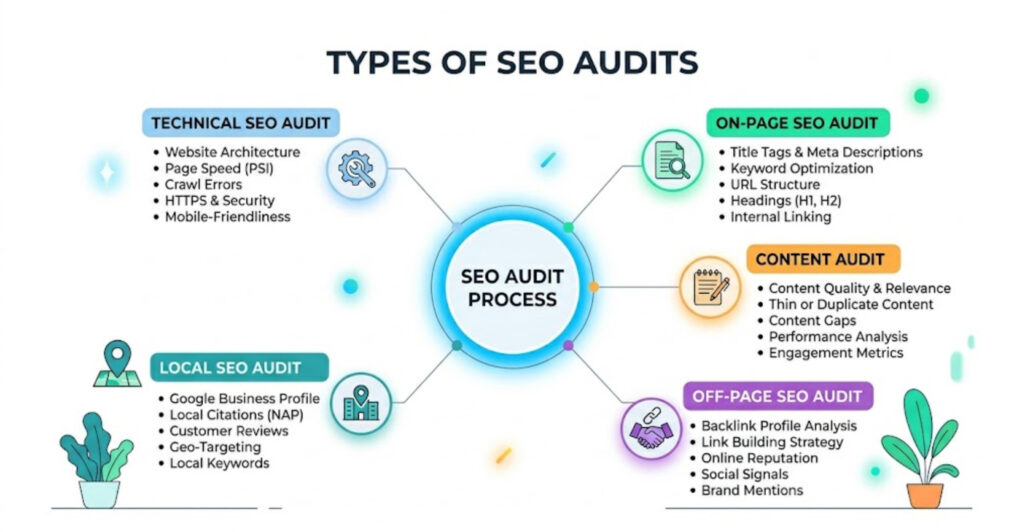
There’s no one-size-fits-all solution to SEO. That’s why different types of SEO audits target different issues. You need to know which one to choose based on your site’s problem and when to use each option.
Technical SEO Audit
A technical SEO audit focuses on your website or web pages’ accessibility to search engines, page load speed, and website security (HTTPS or HTTP, SSL certificate, etc.). This audit checks crawling, indexing, rendering, and website architecture.
Key checks include website crawling completeness, indexing status across all pages, mobile-friendliness scores, and structured data validation. Technical issues block everything else. If Google cannot crawl your site properly, nothing else matters.
On-Page SEO Audit
An On-Page site audit looks at individual page elements like: title tags, meta descriptions, header hierarchy, internal linking, image alt text, and content structure etc. This audit verifies that each page sends clear relevance signals to search engines.
During on-page SEO audit you check for keyword stuffing and ensure meta tags show unique, descriptive values across all pages. You assess content quality for depth and usefulness.
Off-Page SEO Audit
During the Off-Page site audit, you check external signals such as the quality and quantity of backlinks, identify toxic links, compile a list of disavowed links, and check everything that Google can tell you about whether other sites trust you. Social signals (social media presence, activity) and brand mentions without links also contribute to authority.
This off-page SEO audit identifies toxic domains linking to you that need disavowing. It finds opportunities for broken link building. It measures your authority compared to competitors who rank for your target terms.
Content Audit
A content site audit inventories everything you publish. You build a content inventory spreadsheet listing every page, its last update date, current rankings, and performance metrics. Then you evaluate content performance (page views, bounce rates, conversion rates) .
The audit reveals content gaps where your site lacks coverage on topics your audience searches for. It suggests content optimization opportunities. It identifies pages to consolidate, improve, or remove.
Local SEO audit
A Local SEO audit matters for businesses with physical locations. You check Google My Business profiles for accuracy and completeness, and then confirm the consistency of local listings (local directories) online. Don’t forget to monitor the number of reviews and ratings, as well as their sentiment.
Local keywords need proper placement in titles, meta descriptions, and content. NAP (name, address, phone) consistency across hundreds of directories becomes a major ranking factor for local packs.
Benefits of an SEO Audit
A regular SEO audit provides the following benefits:
- Improved user behavior;
- Increased website traffic;
- Increased CTR and leads.
Bad user behavior has a negative impact on your website’s rankings, and slow page load speed can be reasons for bad user experience or content that doesn’t match user intent, etc.
After conducting an SEO audit of your website, identifying all issues and addressing them, your website’s search rankings improve, users spend more time on your site, which improves your rankings and, consequently, increases traffic.
In the process of a site audit, you find that some contact forms on your website don’t work, your marketing funnel needs improvements, or you find headers with weak calls to action. Fixing all of those issues will increase CTR and leads on your website.
How Many Times Should You Audit Your Site for SEO
Frequency depends on your site size and how often you publish changes. A small blog with five posts per month needs quarterly audits. An ecommerce site with thousands of products and daily inventory updates benefits from monthly technical checks.
After major algorithm updates you should audit immediately. Google rolls out several core updates each year plus countless smaller tweaks. Waiting three months to check impact leaves you reacting to problems that started ages ago.
New website launches need audits within the first week. Most launch with critical issues like missing sitemaps, broken redirects, or robots.txt disasters. Catching these early saves weeks of lost traffic. For large enterprise sites with multiple editors, a continuous audit process works better than scheduled reviews. Tools that monitor key metrics daily and alert you to changes keep problems from festering.
What Are SEO Audit Tools
You cannot perform a modern SEO audit without different SEO audit tools that mimic search engine spiders and report everything they find, because manually checking every page for 200 factors takes months or more, depending on the size of the website. But different audit tools have different specializations and functionalities. Here is their categorization:
- All-in-one platforms;
- Technical crawlers;
- First-Party Audit Tools;
- Content Audit Tools;
- On-Page Audit Tools;
- Local SEO Audit Tools.
All-in-one Platforms
These are comprehensive SEO platforms that handle various audit types from a single dashboard. You don’t need five different tools to check your site crawl, backlink analysis, rank tracking, and site audits. Examples include Semrush, Ahrefs, and Moz Pro. Each tool performs a full site crawl, checks your backlink profile, monitors keyword rankings, and identifies technical issues.
Technical Crawlers.
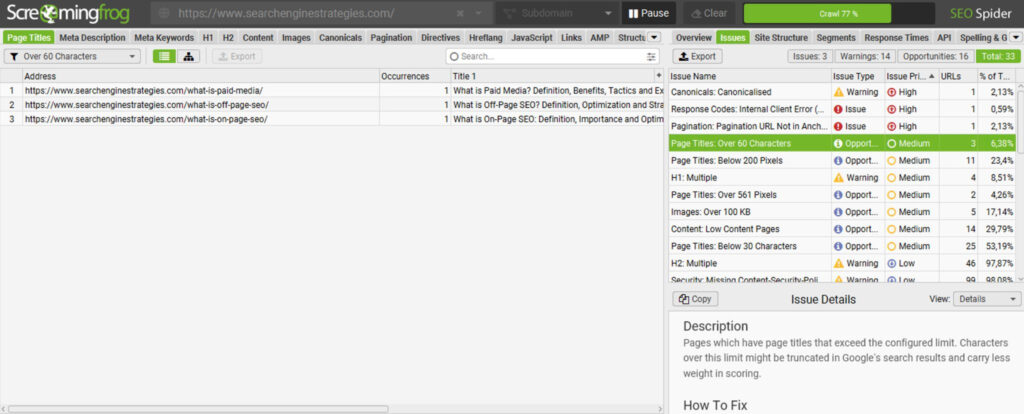
Technical crawlers like Screaming Frog or Sitebulb can affect your entire site structure. They find broken links, missing meta tags, duplicate content, and redirect chains.
These tools reveal what human reviewers never see: a category page returning a 404 error, fifty pages sharing the exact same meta description, or a robots.txt file accidentally blocking your entire blog section. Run a technical crawler monthly or after any major site change.
First-Party Audit Tools
Indexing status checks happen through Google Search Console. This free tool shows which pages Google actually stores in its database. The difference between submitted pages and indexed pages often reveals hidden problems. Mobile friendliness testing tools from Google highlight specific touch targets too small or text illegible on small screens.
Page speed analysis via Google PageSpeed Insights provides lab data and field data. Lab data comes from simulated tests. Field data uses real Chrome user metrics.
Content Audit Tools
Content audit tools inventory your entire website and evaluate what actually performs. They pull hard data on page views, bounce rates, conversions, and keyword rankings. No more guessing which blog posts work or which product pages fail. These tools tell you exactly what to keep, update, merge, or trash.
Examples include ContentKing for real time monitoring, and MarketMuse which uses AI to identify content gaps and optimization opportunities. Another solid option is Sitebulb with its content focused reporting features. These tools turn a messy spreadsheet nightmare into a structured audit you can actually act upon.
On-Page Audit Tools
On-page audit tools focus specifically on individual page elements. On-page SEO tools check title tags, meta descriptions, header hierarchy, image alt text, internal links, and keyword usage. Many all-in-one platforms include this functionality. But dedicated tool like Sitechecker offer faster page by page analysis.
You paste a URL and get an instant report of what is missing or broken. These tools excel at checking large batches of URLs against your optimization standards. Perfect for validating that your writers actually followed your SEO guidelines.
Local SEO Audit Tools
Reviews and ratings management software helps local businesses monitor and respond to customer feedback across dozens of sites. Results tracking and measurement relies on Google Analytics for traffic data.
For content quality evaluation you need human eyes plus readability checkers like Grammarly.
Most SEO professionals use five to seven different applications plus spreadsheets for custom analysis.
How to Do An SEO Audit in the LLM Era
The LLM era demands additions to traditional audit protocols. You still check crawlability and page speed. But you also need to evaluate how LLMs might treat your content. Follow this step by step process.
Phase 1: Pre Audit Preparation
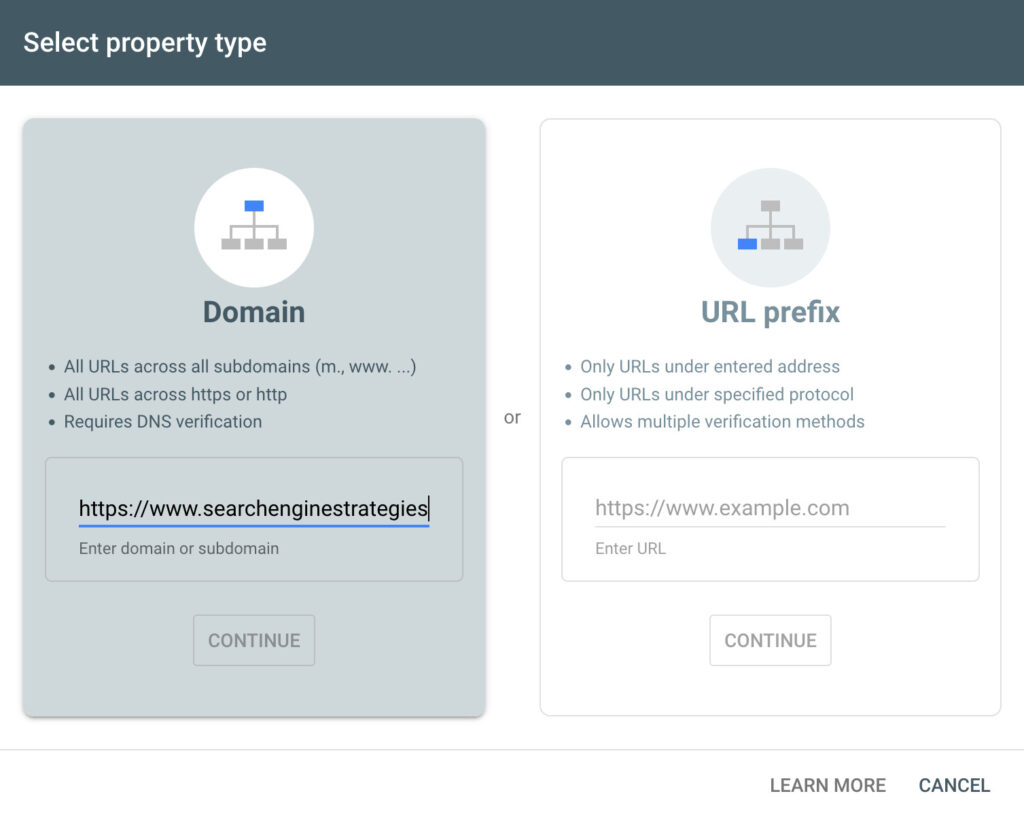
Set up Google Analytics if not already installed after that verify Google Search Console ownership. Choose an online crawling tool that fits your site size.
Write down your main business goals.The audit should prioritize issues that affect those goals. A blog about knitting patterns has different priorities than an ecommerce website.
Phase 2: Technical Foundation Check
Run your crawling tool across the entire website, then export the list of crawl errors. Find 404 pages that still receive external links, restore those pages or redirect them to relevant alternatives.
After that review your robots.txt file for accidental blocks check, a disallowed line setup, because disallow status used wrong can hide entire site sections from Google.
Review indexing status in Google Search Console. Look for pages marked “Crawled currently not indexed” or “Discovered currently not indexed.” These represent content Google knows about but chooses not indexing.
Run Google PageSpeed Insights on pages that are losing rankings or search results, and then follow specific recommendations like “reduce unused JavaScript” or “size images correctly,” etc. to improve your site’s page speed.
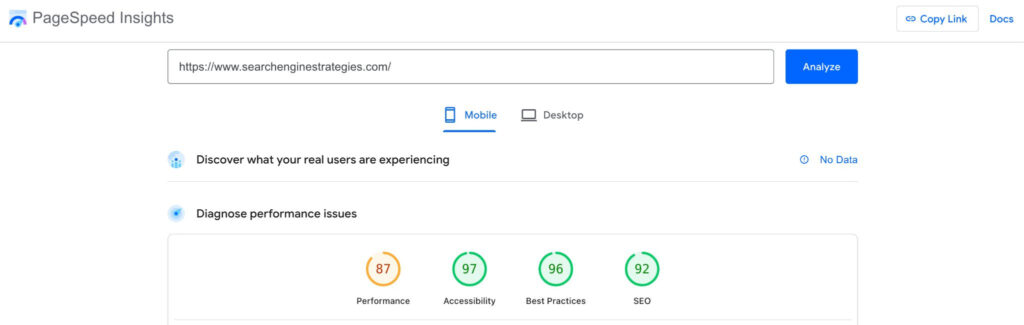
Run mobile friendliness testing for your website. Your mobile version of the website is the primary version for Google, because Google may not crawl and index your page if your site is configured for mobile-friendly indexing.
Phase 3: Site Structure and Navigation Analysis
Map your site structure visually. Draw boxes for each major section and lines showing how pages connect. Good architecture puts important pages closer to the homepage. A product page sitting six clicks deep needs more internal links.
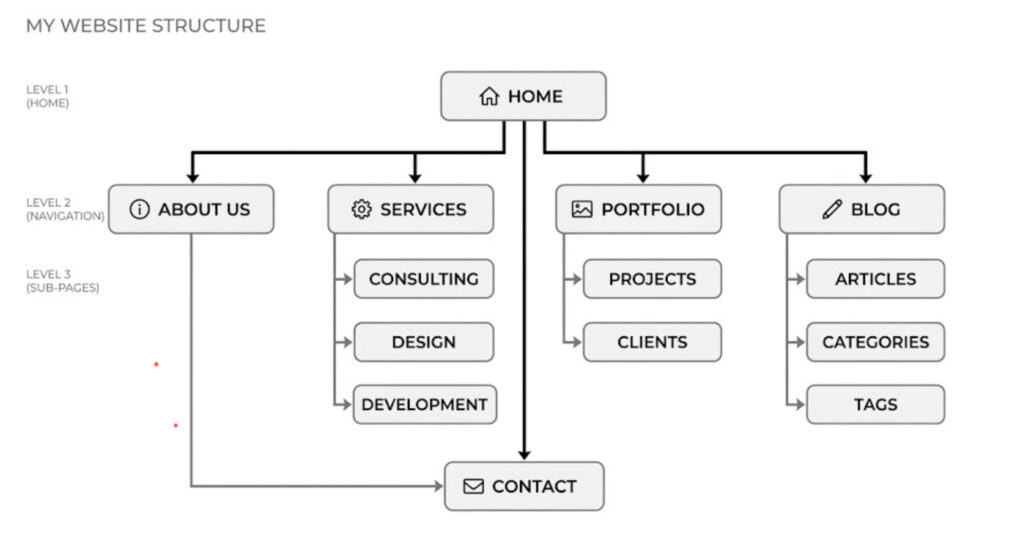
Examine URL structure for consistency. Compare these examples:
Good: domain.com/category/product-name
Bad: domain.com/p=38291?sessionid=9e3r2
Search engines prefer readable URLs that describe the content. Update ugly URLs with 301 redirects from old to new.
Check navigation menus on desktop and mobile. Can users find your best content in two or three clicks? Does the mobile hamburger menu actually work on an iPhone? Test with real fingers, not just mouse clicks.
Phase 4: On-Page and Content Quality Assessment
Select webpages that start losing positions in Google, aren’t indexing, or when you want to boost rankings.
Audit your content for the value it provides to LLMs and real users. Such content can be unique statistics, expert opinions that make a comment special for you, or case studies. All of these can be winning points that your website shows in different LLM
Check keyword optimization in titles and headers. Primary keyword in H1 and at least one H2. Avoid keyword stuffing. Write for humans.
Review meta tags using your crawler. Fix missing titles and duplicate descriptions. Each page needs unique entries. For large ecommerce sites, use templates that insert product name and key differentiator.
Assess internal linking. Your crawler shows which pages have the most links and which have none. Add links from high authority pages to underlinked important pages. This distributes link equity. Also check for broken internal links.
Phase 5: User Experience and Engagement Signals
Analyze user experience factors that influence how people interact with your site and how long they stay. User behavior directly drives Google rankings.
Key factors to check:
- Readability;
- Text structure;
- Page load time;
- Design usability.
Review session recordings using a free tool like Microsoft Clarity to catch design flaws you would otherwise miss. These recordings show exactly where people click, how far they scroll, and where frustration happens. A broken button or an overly intrusive form will chase potential customers away fast.
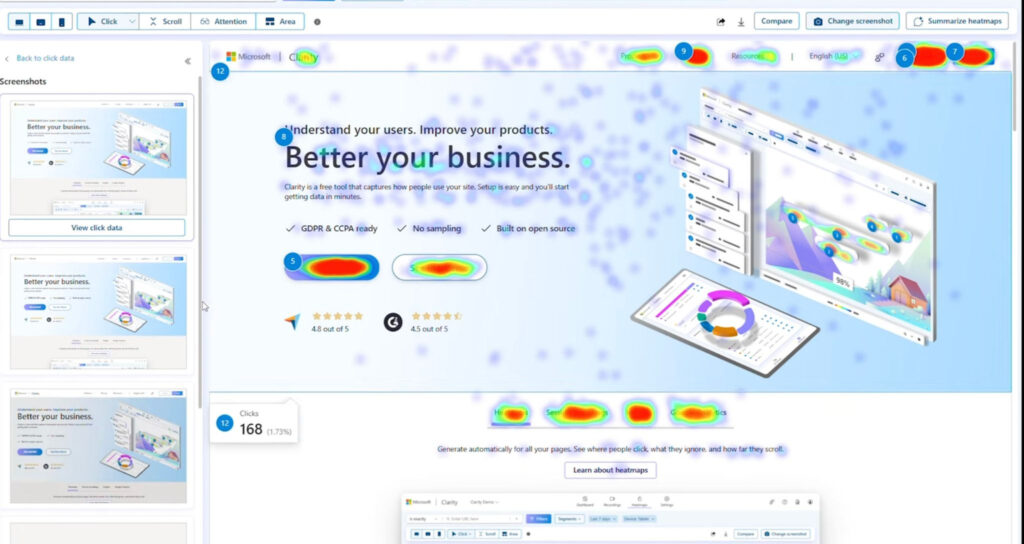
Conversion optimization examines your calls to action and forms. CTAs should use action oriented language (“Get the free guide” not “Submit”). Forms should request the minimum information necessary. Each extra field drops conversion rates by 5% to 15%.
Phase 6: Off-Page Analysis
Analyze your backlink profile using the following criteria as part of your off-page seo checklist: links from relevant industry sites, editorial links, diverse anchor text, and links from pages with their own organic traffic.
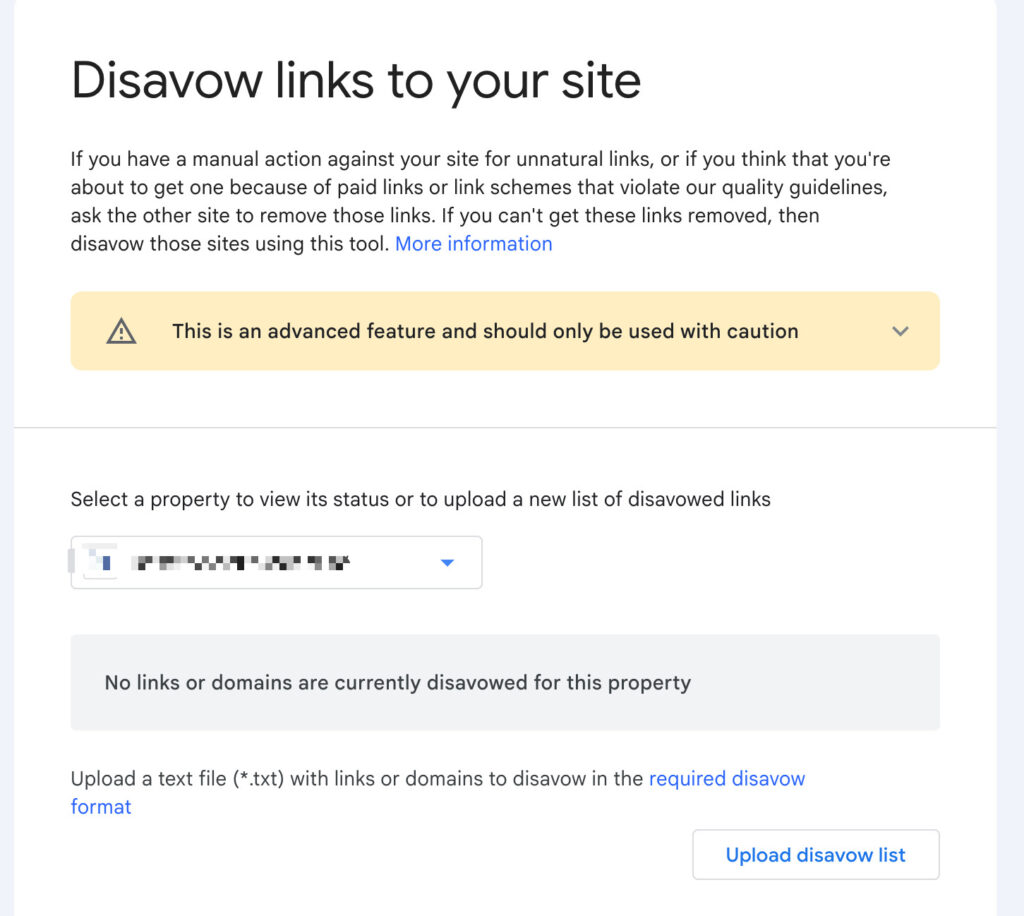
For spammy links, create a disavow file listing these domains and submit it through the Google Disavow Tool. For overly spammy anchor text, review your site’s anchor text strategy.
Social signals matter less than link building for Google rankings, but it’s a positive signal for Google when your content is shared on social media.
Brand mentions are what you must care about if you want to have a strong presence in different LLMs. Because if your brand name has a lot of citations, links, and mentions on other websites, it signals that your website is trusted enough to be cited in LLMs.
Phase 7: Local SEO Elements (If Applicable)
For local businesses, audit your Google My Business profile first. Verify every field is complete. Photos should be recent and show your actual location, not stock images. Posts (updates, offers, events) should be published weekly.
Check local citations across major directories. Moz Local or BrightLocal automate this. Inconsistencies kill local rankings. If your address appears as “123 Main St” on Google but “123 Main Street” on Yelp, search engines get confused.
Respond to reviews and ratings systematically. Thank positive reviewers within 48 hours. Address negative reviews professionally without getting defensive. Apologize, offer a solution, and take detailed conversations offline. Google observes response patterns as engagement signals.
Target local keywords in your content strategy. A bakery in Seattle should create pages for “wedding cakes Seattle” and “gluten free bakery Capitol Hill” not just generic “bakery” phrases.
Phase 8: LLM Specific Checks
Add these checks because standard SEO audits ignore them. First, search your target keywords and observe whether Google shows AI Overviews. If yes, note whether your content gets cited as a source. Being cited drives traffic even if clicks decrease. Not being cited means you lost visibility.
Second, ask an LLM (ChatGPT, Claude, Gemini) questions your content should answer. Compare the AI response to what your page says. If the AI gives a worse answer, your content fails. If the AI gives a better answer, the AI becomes your competitor.
Third, verify your content includes unique data, perspectives, or frameworks not easily scraped from other sources. LLMs train on public web data. Generic content adds no value because the AI already ingested ten similar versions.
Fourth, check whether your brand appears in LLM training data. Ask “What does [Your Brand] do?” to various models. If they return wrong information or nothing at all, your brand lacks the web visibility needed for LLM inclusion.
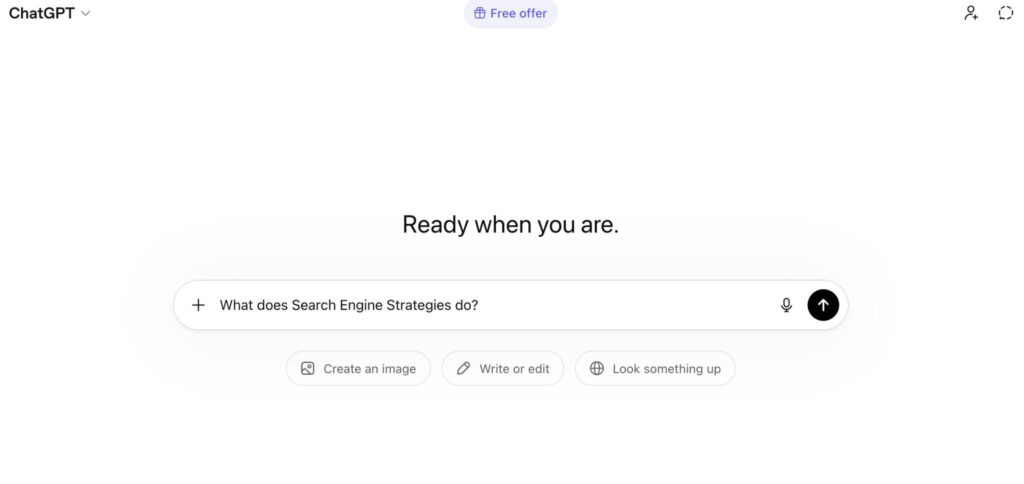
Fifth, optimize for conversational queries. LLMs changed how people search. Voice searches and typed questions now use natural language. “Best pizza near me open now” replaces “pizza restaurant open late.” Your audit should verify you answer whole questions, not just keywords.
Phase 9: Setup Ongoing Monitoring
An audit gives you a snapshot. Monitoring gives you a movie. Set up dashboards in Google Looker Studio connecting Google Analytics, Google Search Console, and any other data sources. Track weekly changes in clicks, impressions, average position, and core web vitals.
Configure alerts for sudden drops. A 30% traffic decline over two days demands immediate investigation not waiting for next quarter’s audit. Most crawling tools offer scheduled reports. Run a small weekly scan of your most important pages.
Document everything. In the future you will want to know what changed between audits and why certain decisions happened. A simple changelog in a shared document prevents repeating mistakes and supports consistent strategy.
Related Posts
Ethan Parker
March 20, 2026
Off-Page SEO Checklist: Build Authority in 10 Steps
You built a beautiful website. The on-page SEO is tight. Headers flow, keywords sit naturally, and your content beats the…
Ethan Parker
January 23, 2026
What is SEO? A Beginner’s Guide to Search Engine Optimization
What is SEO? SEO stands for Search Engine Optimization. It’s the thing you do when you want Google or Bing…
Ethan Parker
May 21, 2026
How to Do a Full SEO Competitor Analysis: Step-by-Step
Running a SEO competitor analysis isn’t optional if you want organic traffic. It reveals exactly why others outrank you. This…
Ethan Parker
February 26, 2026
What is On-Page SEO: Definition, Importance and Optimization
Search keeps flipping upside down these past few years, AI Overview eating clicks, results looking weirder by the month. Yet…
Ethan Parker
March 19, 2026
10 Common Technical SEO Issues Killing Your Rankings (And How to Fix Them)
SEO issues often lurk quietly in most websites. They silently sabotage your Google rankings without any warning. One overlooked server…
Ethan Parker
February 26, 2026
What is Off-Page SEO? Definition, Optimization and Strategies
You’ve built a beautiful website. The content is sharp, the keywords are placed just right, and the pages load faster…
Ethan Parker
May 22, 2026
10 Actionable SEO Tips to Boost Your Rankings and LLM Visibility
Getting SEO advice from random blogs wastes your time. Real SEO requires tactics that work for both Google algorithms and…
Ethan Parker
May 05, 2026
How to Create a Winning SEO Strategy?
SEO has changed and SEO strategy is no longer limited to just keywords. That old playbook is dying and what…
Ethan Parker
March 23, 2026
What is Technical SEO? A Complete Guide
What is technical SEO? Ask ten marketers about technical SEO and you will collect ten different definitions. Server logs come…
Ethan Parker
April 30, 2026
How Do I Check My Google Ranking For Free?
Putting time or money into Search Engine Optimization without measuring the results of that work does not make much sense.…