
 Ethan Parker
March 19, 2026
Ethan Parker
March 19, 2026
What is Technical SEO? A Complete Guide
What is technical SEO? Ask ten marketers about technical SEO and you will collect ten different definitions. Server logs come…
What is technical SEO? Ask ten marketers about technical SEO and you will collect ten different definitions. Server logs come up. JavaScript frameworks provoke impassioned gestures. One will likely shrug and call it “the stuff that breaks.” They are all correct. Technical SEO forms the foundation. Architecture supporting every piece of content. When Googlebot arrives at your door, this layer ensures the bot gets more than entry. It receives a guided tour, a clear map, and an invitation to stay.
Consider the backstage crew at a stadium concert. The crowd sees lights, hears thunderous sound, and leaves satisfied. But rigging fails and the show collapses. Power shorts out and silence follows. Cables tangle and chaos erupts. Technical SEO mirrors that unseen infrastructure. Without it your content becomes noise echoing through an empty venue.
What Is Technical SEO
You publish brilliant content. Well-written, keyword-targeted, optimized to convert. Days pass. Nothing. No Google visibility. No clicks. It might as well not exist.
That signals technical SEO failure.
Break this down through Google’s actual lens. Crawling asks whether Googlebot can access your pages following internal links and sitemap instructions. Rendering examines if Googlebot fully loads your content including JavaScript, images, and dynamic elements. Indexing determines if Googlebot stores and organizes that content correctly within its massive database. Ranking reveals whether your technical setup enhances or limits visibility.
Technical SEO puts you in control of these steps. On your terms.
Technical SEO Short Definition
Technical SEO is the practice of optimizing a website’s infrastructure covering crawlability, indexing, rendering, site architecture, page speed, and server configuration so search engines can effectively access and understand your content.
Why Is Technical SEO Important
Why is technical SEO important? Let’s get real. Google doesn’t read like humans. It runs on bots with budgets, time limits, and technical constraints.
According to our analysts, the biggest leak in most marketing funnels isn’t conversion rate. It’s crawlability. Googlebot arrives at your site. It hits redirect chains or a robots.txt file that accidentally blocks CSS. It leaves. Crawl budget departs elsewhere. Your new blog post, that piece of content you spent weeks perfecting, sits in a digital void. Unindexed.
Technical SEO matters because it directly impacts rankings. But it’s not just about rankings. It’s about user experience. Google wants to rank sites that work well. Your LCP hits six seconds. Users bounce at 80 percent rates. Google sees that behavior. A bad signal.
Technical SEO also serves as the gatekeeper for structured data or schema markup. You can host the most delicious recipe on the web. Without schema markup, Google might not show rich snippets including star ratings, cook time, and calories. You lose the click. The traffic. The sale.
It’s also about trust. HTTPS and site security are technical SEO factors. Users see “Not Secure” in the browser bar. They leave. Google observes that. Security is a baseline expectation, not a nice to have. So if you’re asking “Is technical SEO hard?” you’re asking the wrong question. The right question is “Can I afford to ignore it?”
Key Components of Technical SEO
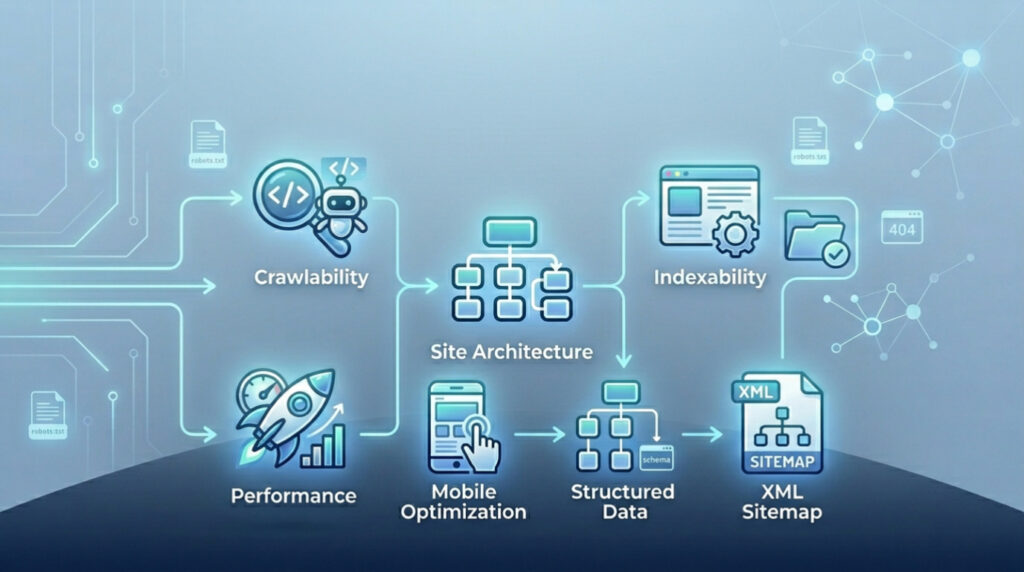
Let’s break this down. Technical SEO isn’t one thing. It’s a constellation of interconnected systems. You can’t just “do technical SEO.” You have to manage the components.
- Crawlability: Determines if Googlebot can access your site. Involves robots.txt, crawl budget management, and log file analysis. You need to know which bots are visiting and what they’re ignoring;
- Indexability: Decides whether crawled pages get stored. Canonical tags and status codes control this. Use a 301 redirect for permanently moved pages. Use a 404 status code for pages that don’t exist. Use a 410 status code when you want to explicitly tell Google a page is gone for good;
- Rendering: Represents the new frontier. How does Google see your JavaScript? Client side rendering demands Googlebot execute that JS and see the final content. Server Side Rendering or SSR often solves this;
- Site Architecture: Covers URL logic, internal links, and link equity flow. Flat architecture usually performs better. You don’t want pages buried six clicks deep;
- Performance: Focuses on page speed and Core Web Vitals. LCP, INP or Interaction to Next Paint, and CLS or Cumulative Layout Shift form the key metrics. Your site jumps around while loading. Users get angry. Google tracks that anger;
- Mobile Optimization: Matters because Google uses mobile first indexing. The mobile version of your content drives ranking. A broken mobile site drags desktop rankings down;
- Structured Data: Schema markup acts as your direct language to Google’s algorithms. Enables entity recognition, telling Google exactly what things mean beyond the words on the page;
- XML Sitemap: Functions as your official invitation. Lists all important URLs you want Google to know about. Not a guarantee of crawling. A strong hint.
Is Technical SEO Hard
Honest answer? It depends on your starting point. If you’re building a new site from scratch with a clean site architecture, proper HTTPS, and a solid plan for mobile optimization? It’s manageable. You’re building the house on a concrete slab.
But if you’re dealing with a legacy site? A Frankenstein monster built over fifteen years with different CMS platforms, a thousand redirect chains, and duplicate content issues spread across three subdomains? Yeah. That’s hard. That’s the kind of hard that makes grown developers cry into their coffee.
We think the difficulty is often overstated by agencies trying to sell you services. But we also think it’s understated by DIY marketers who think “installing an SEO plugin” is the same as technical SEO.
The real challenge isn’t the complexity of the tasks. It’s the prioritization. You have to look at your log files and figure out if Googlebot is wasting crawl budget on useless parameters. You have to decide whether to fix a canonical tag issue on a low-traffic page or optimize LCP on your main product page. Those decisions require context. They require data.
Another layer of difficulty: JavaScript. That’s the big one. Historically, Googlebot was a text-only bot. Now it has a rendering queue. It crawls the HTML first, then queues the page for rendering, which can take days. If your content relies entirely on JS to appear, you’re introducing a delay. If your JS fails, your content never appears. According to our data, more than 60% of mid-sized e-commerce sites have some form of JS indexing issue. That’s hard to diagnose. That’s hard to fix.
But here’s the secret: you don’t have to be a developer. You just have to know what questions to ask. You need to know how to use Google Search Console (GSC) . You need to know how to interpret a status code. You need to know the difference between crawling and indexing. You don’t need to write the code; you need to manage the outcomes.
How Search Engines Crawl and Index
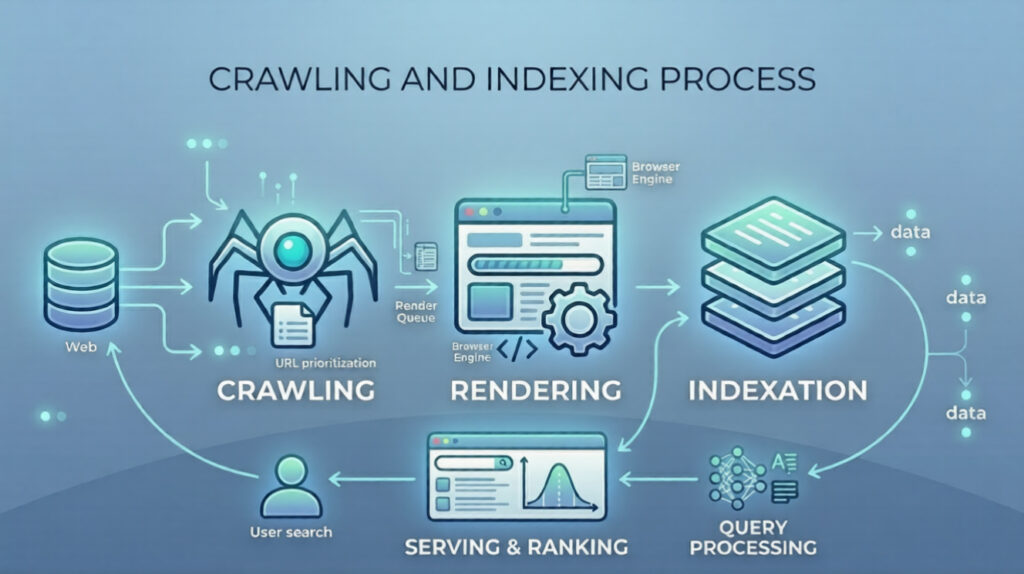
To fix technical SEO, you have to understand the process. Search engines don’t magically know about your site. They follow a three-step process: crawling, rendering, and indexing.
Crawling
It starts with crawling. This is discovery. Googlebot, the crawler, is like a digital spider. It follows links. It starts with a list of URLs from previous crawls, from XML sitemaps, and from submitted URLs in Google Search Console. It requests the page. It reads the HTML. It looks for new links.
This is where robots.txt comes in. Before Googlebot even requests the page, it checks the robots.txt file. This is the bouncer. If the robots.txt says “Disallow: /private/“, Googlebot doesn’t even knock. It walks away. This is a double-edged sword. If you accidentally disallow your CSS or JS files, Googlebot sees a broken page. It can’t render it.
Rendering
Then comes rendering. This is the execution phase. After Googlebot has the HTML, it puts the page in a queue. A headless browser (Chrome) loads the page. It runs the JavaScript. It loads images. It applies CSS. It waits for the page to stabilize. This is why INP matters. If a page is constantly loading new content via JS, the rendering process might time out. Google might say, “I see the initial HTML, but I didn’t wait for the rest.”
Indexation
Finally, indexing. This is storage. Once Google understands the page’s content—both the HTML and the rendered DOM—it stores the information in its index. This is the library. It analyzes the content, the structured data, the canonical tags, and the status codes. If the page has a noindex meta tag, it’s not stored. If it’s a 404, it’s removed.
This process isn’t instant. It takes time. Crawl budget is the resource allocation. Google only has so many resources to allocate to your site. If you have 100,000 thin pages with low value, Googlebot might spend its budget there and never get to your 10,000 high-value product pages. That’s why log file analysis is so powerful. It shows you exactly how Googlebot is spending its time.
Common Technical SEO Issues
Let’s talk about the stuff that breaks. The stuff that keeps technical SEO specialists employed.
- Broken Redirects. You move a page. Set up a 301 redirect. But you send it to a page that redirects somewhere else. That’s a redirect chain. It wastes crawl budget. Dilutes link equity. Sometimes you end up in a loop. A death spiral. The page never loads.
- Orphan Pages. These have no internal links. They exist. Content is there. But nothing on your site points to them. Googlebot might stumble in through an XML sitemap. Still, they’re essentially hidden. Link equity never flows their way. Authority stays low.
- Duplicate Content. Same content. Multiple URLs. http vs https. www vs non-www. URL parameters spin it out. Google gets confused. Which version gets indexed? Canonical tags are supposed to fix it. They’re often implemented wrong.
- Soft 404s. This one is nasty. A page returns a 200 status code. Everything looks fine. But the actual content says “Page Not Found.” Googlebot is confused. It thinks the page exists while serving error content. Crawl budget wasted.
- JavaScript Rendering Issues. If your JavaScript relies on clicks or scrolls to load content, Googlebot won’t see it. Googlebot doesn’t click. Doesn’t scroll. It loads. It waits. Content behind a click event? Invisible.
- Mobile Usability Issues. Mobile-first indexing is the standard. If your mobile site has text too small, clickable elements too tight, or viewport problems, you get demoted. Google Search Console has a “Mobile Usability” report. Ignore it at your peril.
- Slow Page Speed. Specifically, poor Core Web Vitals. High LCP means main content drags. High CLS makes the page jump around. High INP? The site feels sluggish under your fingers. These are ranking factors.
Run your own Off-Page SEO Checklist alongside these technical fixes. Authority needs both sides.
Advanced Technical SEO Techniques
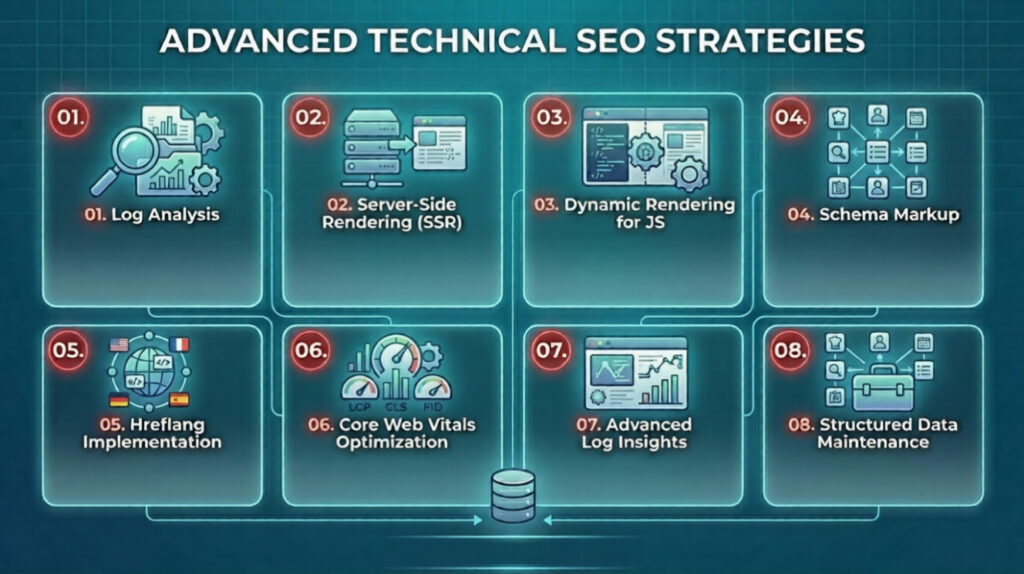
Once you’ve fixed the basics, you can get into the weeds. This is where technical SEO moves from maintenance to competitive advantage.
Log Analysis
Log File Analysis. Most people ignore their server logs. They’re messy. Raw. But they tell the truth. You see exactly which pages Googlebot hits, how often, and what status codes come back. Cross-reference this with Google Search Console. You might discover Googlebot spends 80% of its time crawling a faceted navigation filter. Zero SEO value. Block those parameters in robots.txt. Free up crawl budget for pages that actually matter.
Server Side Rendering or Dynamic Rendering for JS
Server Side Rendering (SSR) or Dynamic Rendering for JavaScript sites. React apps. Angular apps. You’re asking Googlebot to run complex code. That’s risky. SSR sends fully rendered HTML to Googlebot. The bot doesn’t wait. Content appears immediately. According to our analysts, moving from client-side rendering to SSR often delivers a 20-30% increase in indexed pages within weeks.
Hreflang Implementation
Hreflang implementation for international sites. This one is a beast. Multiple languages. Multiple regions. You need to tell Google which version belongs to whom. One misplaced hreflang tag and French users get the Spanish site. Messy. Error-prone. But when it’s done right, it’s powerful.
Schema Markup
Schema Markup. Evolving fast. We’re not just talking simple JSON-LD for articles anymore. Entity recognition is the game. You can use structured data to define your brand’s entity. Your products. Your people. Your locations. In the AI era, Google tries to understand entities, not just strings. Define relationships with schema markup and you help the Knowledge Graph connect the dots.
Core Web Vitals Optimization
Core Web Vitals optimization. This goes beyond compressing images. Lazy loading. Preloading critical resources. Optimizing the Critical Rendering Path. Modern image formats like WebP or AVIF. It’s a technical deep dive. Requires coordination with hosting providers, CDNs, and development teams.
What is The Future of Technical SEO in AI Era
The AI era is here. It’s changing everything. But the fundamentals of technical SEO? They’re becoming more important, not less.
Think about it. AI is great at generating content. We see sites pumping out thousands of AI-generated articles a day. But if your site architecture is a mess, if your crawl budget gets wasted on auto-generated tag pages, if your JavaScript blocks the bots—AI won’t save you. It makes things worse. More content means more demands on crawl budget. More pages mean more potential for duplicate content and canonical tag issues.
The future is about entity recognition. Google’s algorithms—RankBrain, the newer AI models—aren’t just matching keywords anymore. They’re trying to understand concepts. They want to know if your site is the authoritative source for a specific entity. A person. A place. A thing. Technical SEO facilitates this. Structured data helps. Internal links with semantic relevance help. You help the AI understand your site’s context.
We also see a shift toward user-centric metrics. Core Web Vitals were just the start. The next wave will likely involve more engagement-based signals. How long until a page becomes interactive? Does the INP feel smooth? These are technical measurements. They reflect user experience.
Another trend: the death of the third-party cookie. Technical SEO professionals will need to work more closely with analytics teams. First-party data collection cannot interfere with site performance. Balancing privacy, performance, and personalization is a technical SEO challenge.
And finally, AI is becoming a tool for technical SEO itself. We use AI to parse log files faster. We use AI to identify patterns in redirect chains. We use AI to prioritize crawl budget allocation. It’s a feedback loop. The thing you’re optimizing for is increasingly being used to optimize it.
FAQs of Technical SEO
What is the difference between crawling and indexing?
Crawling is discovery. It’s Googlebot visiting your site, following links, reading the HTML. Indexing is storage. Google processes that crawled data, analyzes it, adds it to their database.
You can be crawled without being indexed. That’s what a noindex tag does. You can’t be indexed without being crawled first. They are sequential steps in the same process, but they serve distinct functions.
How do I check if a page is indexed?
The quickest way is to use Google Search Console. Open the URL Inspection tool. Paste your URL. If it says “URL is on Google,” it’s indexed. If it says “URL is not on Google,” you’ll get a reason. Maybe it’s blocked by robots.txt. Maybe it has a noindex tag. Maybe it’s a 404.
You can also use thesite: search operator in Google. That’s less reliable. It only shows if the page is in the index. It won’t tell you why it might be missing.
What is a robots.txt file and how does it work?
The robots.txt file lives at the root of your domain.yourdomain.com/robots.txt. It’s a set of instructions for bots. It tells them which parts of your site they are allowed to crawl.
It’s like a “No Trespassing” sign.
If you block a page in robots.txt, Googlebot won’t crawl it. But if Googlebot never crawls it, it can’t see a noindex tag. So if you want a page out of Google, you use a noindex tag. Not robots.txt. That’s a common mistake.
Why is sitemap important?
The XML sitemap is your list. You telling Google, “Here are all the pages I consider important.” It doesn’t force Google to crawl them. But it helps with discovery.
It’s especially important for large sites. New sites. Sites with poor internal linking. It also provides metadata about when pages were last updated and their priority relative to other pages on the site.
How do I test if Google can see my JS content?
Use the URL Inspection Tool in Google Search Console. After entering your URL, click “Test Live URL.” Once the test completes, click “View Tested Page.” Then go to the “More Info” section. Look at the screenshot. Is the content there? Look at the “Page Resources” tab. Did Google successfully load your JavaScript files? You can also use the “View Crawled Page” to see the raw HTML Google saw versus the rendered DOM. If there’s a mismatch, you have a JavaScript indexing problem.
Related Posts
Ethan Parker
March 19, 2026
10 Common Technical SEO Issues Killing Your Rankings (And How to Fix Them)
Technical seo issues lurk quietly in most websites. They sabotage rankings without fanfare. One overlooked server error or sloppy redirect…