
 Ethan Parker
March 19, 2026
Ethan Parker
March 19, 2026
What is On-Page SEO: Definition, Importance and Optimization
Search keeps flipping upside down these past few years, AI Overview eating clicks, results looking weirder by the month. Yet…
Search keeps flipping upside down these past few years, AI Overview eating clicks, results looking weirder by the month. Yet On-Page SEO? Still standing tall, still the thing that actually gets your words in front of people who give a damn.
We think ignoring it now is straight-up reckless. This guide lays out plain what On-Page SEO really means, why it hits harder than most folks admit, and the exact moves you can pull today to make your pages pop instead of rot unseen. Jump in.
What is On-Page SEO: Definition
On-page SEO covers everything you tweak right on your web pages to help Google figure out the topic fast and keep visitors from bouncing quickly. Think titles, meta descriptions, headings, body content, images with decent alt text, clean URLs, speedy loads, mobile setup, schema code, internal links. All the stuff sitting in your HTML that search engines read first.
We think it matters way more since AI Overviews steal clicks and thin pages vanish. If you do the basics right, your content has a chance to produce great results or be pulled by AI. If you skip over the parts that are supposed to be funny, people won’t notice the good writing.
Why On Page SEO is Important
Here’s a number that’ll mess with your head. Something like ninety percent of web pages get zero traffic from Google. Zero. Not ten visitors. Not five. Zero. They exist in a digital ghost town. tumbleweeds rolling through.
You don’t want that.
On-page SEO wakes your pages up. It shouts at Google. It says “this content is alive and it matters.” But it’s not just about robots. It’s about people too.
When someone clicks your link, they want answers. Fast. If your page loads slow, they leave. If they can’t find what they’re looking for, they leave. If your headings are a mess and the text looks like a wall, they definitely leave. That’s called bouncing. Google notices bouncing. It thinks “huh, maybe that page wasn’t so great after all.”
Dwell time matters too. That’s how long someone sticks around before heading back to the search results. Longer dwell time tells Google you’re doing something right. People are reading. They’re engaged. They’re not running for the hills.
We think on-page SEO is the closest thing to a magic wand in digital marketing. Not actual magic. Just hard work that pays off. You build something once. It pulls traffic for years. Compare that to ads. You stop paying, you stop getting visitors. On-page SEO keeps giving.
Google lays all this out in their Search Central docs. It’s not a secret. They tell you what they want. You just have to listen.
Most Important On-Page SEO Elements
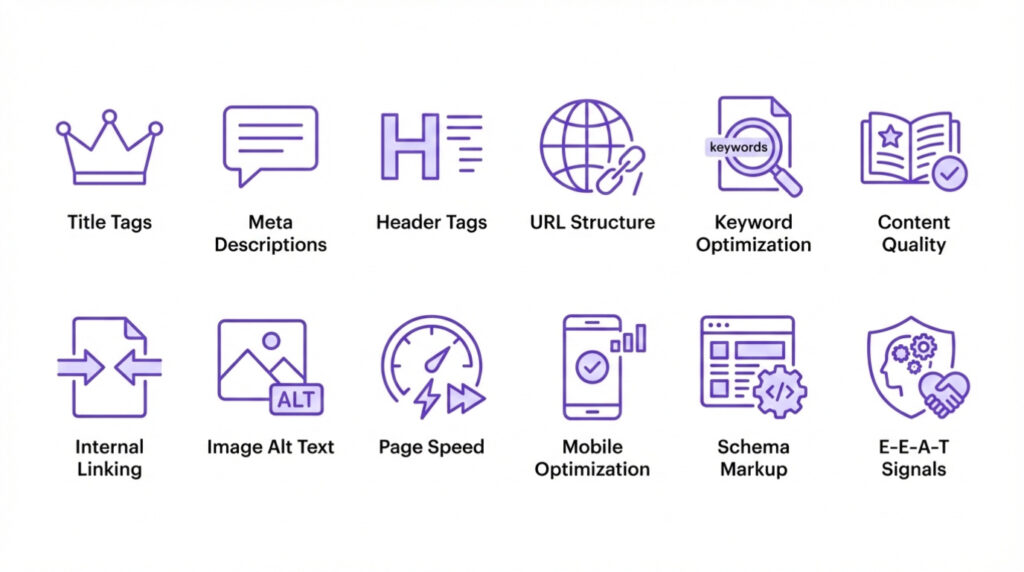
On-page SEO packs a punch when you nail the basics right from the start, keeping search engines happy while users stick around longer. We think focusing on these elements turns average pages into traffic magnets, especially with AI shaking up results these days. Dig in.
Title Tags
Craft ’em short, punchy, around 50-60 characters so they don’t get cut off in results. Stick your main keyword up front if it flows natural, like you’re chatting with a buddy about what the page really offers. Honestly, bad titles tank clicks fast; good ones pull folks in without trying too hard. According to Ahrefs’ analysis of nearly a million pages, Google rewrites titles about 33% of the time, and titles longer than 60 characters are 57% more likely to get rewritten
Meta Descriptions
These little blurbs under your title in search listings? Make ’em count by summing up the page in 150 characters or less, tossing in keywords casually. We see sites boost click-through rates big time just by writing these like teaser trailers, sparking curiosity. Skip the stuffing though, or it backfires.
Header Tags
Start with one solid H1 that grabs the gist of your content, then layer in H2s and H3s to break things up like a roadmap. Keywords slip in here easy, but keep it readable first. Pages without clear headers feel messy, confusing bots and people alike; structured ones guide eyes smooth. John Mueller has confirmed that headers help them understand the page structure, even if they’re not a heavyweight ranking factor
URL Structure
Keep URLs clean, short, with keywords hyphenated in like domain.com/keyword-phrase. Ditch the numbers and gobbledygook that screams spam. According to our analysts, simple slugs help crawlers get your topic quick, plus they look trustworthy when shared around.
Keyword Optimization
Scatter primary keywords through the first 100 words, then mix in variations without forcing it. Tools show density around 1-2% works best, but maybe aim lower to sound human. Overdo it and you risk penalties; underplay and nobody finds you.
Content Quality and Relevance
Pump out original stuff that answers questions deep, with facts, examples, maybe a list or two thrown in. Long-form wins often, but only if it’s meaty not fluffy. We think matching user intent trumps word count every time. Thin pages drop ranks. Fix that.
Internal Linking
Link to your own pages smart, using anchor text that describes what’s coming. Builds site authority, keeps visitors bouncing around longer. Maybe add 3-5 per post, no more unless it fits. Neglect this and your site’s like isolated islands, hard for engines to value the whole thing. A Zyppy study of 23 million internal links found pages with 40+ internal links got 4x more clicks from search
Image Alt Text
Every pic needs alt text describing it clear, keywords included where they belong. Helps visually impaired folks too, and boosts image search traffic. Sloppy alts waste chances; crisp ones add sneaky SEO juice.
Page Speed
Nobody waits for slow loads anymore, so compress images, minify code, use caching. Tools like Google’s PageSpeed Insights flag fixes easy. We see fast sites rank higher across boards, especially mobile. Laggy ones bleed users quick.
Mobile Optimization
Design responsive so pages shift seamless on phones, no pinching or zooming needed. Test on real devices, not just simulators. With most searches mobile now, ignoring this kills your game. Maybe tweak fonts bigger for thumbs. Google uses mobile-first indexing, meaning they primarily use the mobile version of your content for ranking
Schema Markup
Add structured data code to highlight reviews, events, whatever fits your content. Makes rich snippets pop in results, drawing eyes. Honestly, it’s techy but plugins handle most; skip it and you miss standing out in crowded SERPs. Google’s article schema documentation shows exactly how this works.
E-E-A-T Signals
E-E-A-T signals expertise through author bios, cited sources, updated dates. Builds trust with Google, especially for advice-heavy topics. We think freshening old posts with new info signals you’re on top of things. Fake it and you plummet; earn it and climb steady. These concepts come straight from Google’s Quality Rater Guidelines, which human raters use to assess search result quality.
How to Do On Page Optimization: Step-by-step
On-page optimization means tweaking stuff right on your pages so search engines figure out what you’re about fast and users don’t bounce in two seconds. With AI overviews stealing clicks, you gotta make pages crystal clear for both crawlers and those summary-snatching bots. We think nailing these steps turns okay pages into ones that actually show up and stick.
Step 1: Start Keyword Research
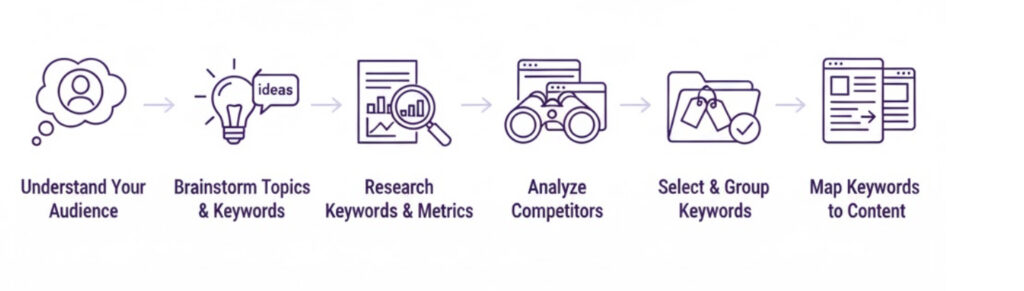
Pick one solid main keyword or tight theme per page. Dig into tools like Google Keyword Planner, check what people actually type, match the intent hard.. Stuff like informational versus buying intent changes everything. Skip broad junk. Target something specific enough to win.
Step 2: Set the Title Tag
Write titles under 60 characters, shove the keyword near the front if it reads smooth. Make ’em clickable, promise something real. Numbers, questions, power words pull more taps according to our data. Weak titles kill traffic before it starts.
Step 3: Write Meta Descriptions
Keep these around 150-160 characters, tease the best bits, drop the keyword naturally. Write like you’re selling the click without sounding salesy. Good ones boost CTR big time. Blank or auto-generated ones look lazy.
Step 4: Configuring The Headers Structure
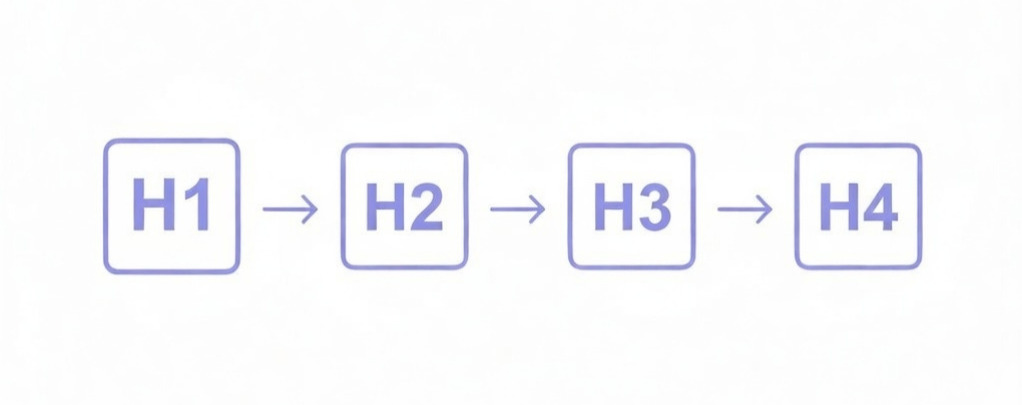
One H1 only, matching your main keyword and page purpose. Then H2s, H3s break the flow logical, keywords sprinkled where they fit. Readers scan. Bots love structure. Messy headers make pages feel chaotic.
Step 5: Build Clean URL Slugs
URL slugs should be short, contain target keywords, and be human readable. For example, /how-to-optimize-on-page-seo instead of /post?id=472. Clean URLs quickly signal relevance. No one shares ugly URLs, and Google doesn’t like them.
Step 6: Optimize Content Quality
Write deep, original сontent that answers the search fully. Aim for help over fluffy. Cover subtopics, add examples, citations from experts in your niche, lists and tables. Update dates to show freshness. Thin content gets buried now.
Step 7: Keyword Placement Analysis
Insert the main keyword at the beginning of the title tag if it sounds natural, as this placement helps search engines and users quickly determine relevance. Insert it naturally in H1, then weave it into the first 100 words of the introductory paragraph. Place variations and related terms in subheadings such as H2 and H3 without oversaturating the text. Keep the overall density low, around 1% or less, as oversaturation looks like spam and quickly lowers your ranking.
According to our analysts, the best results come from writing the text in a conversational manner first, then checking to see if the keyword appears enough in key places, such as image alt text, URLs, and perhaps again at the end for good measure. We believe that natural flow always trumps rigid rules.
Step 8: Image Optimization
Compress those chunky images hard before you upload them. Big files slow everything down, and nobody likes waiting forever on mobile. Rename your image files to something descriptive and keyword-friendly right from the start, like best-running-shoes-2026.jpg instead of IMG_4729.jpg.
Then slap on alt text that actually describes the picture clearly, toss in a keyword only when it fits naturally, no cramming junk. We think solid alt text does double duty: screen readers love it, and Google grabs extra traffic from image searches without much extra work. Blank or lazy alts like “image” or “pic1”? Total waste of free ranking juice. The SearchPilot A/B test found that adding keyword-rich alt text had no detectable impact on organic web search traffic, though it remains important for image search and accessibility.
Step 9: Add Internal Links
Link to your own other pages inside the content using anchor text that actually tells people and search engines what they’ll find when they click. Think “check out our guide to mobile speed tweaks” instead of boring “click here” or naked URLs. Aim for 3 to 5 good internal links per post, maybe more if the topic sprawls naturally, but don’t go crazy stuffing every paragraph. Those links keep visitors hopping around your site longer, which Google notices and likes.
They also spread page authority around, helping weaker pages borrow some strength from stronger ones. Pages that sit all alone with zero incoming links from your own site? They usually rank worse, get crawled less often, and feel disconnected. We think smart internal linking acts like invisible glue holding everything together. Skip it and your whole site suffers quietly. Fix it and watch the crawl budget flow better.
Step 10: Test Page Load Speed
Hit Core Web Vitals targets dead-on because Google still weighs them heavy for rankings. Aim for Largest Contentful Paint under 2.5 seconds, Interaction to Next Paint at 200 milliseconds or less, Cumulative Layout Shift below 0.1. Measure at the 75th percentile of real user data.
Compress images aggressively, minify CSS and JS, enable browser caching everywhere you can, lazy load images and offscreen stuff so they don’t block the initial render. Mobile pages especially need to load fast. Users bail if the whole thing doesn’t feel snappy in under 3 seconds. Slow sites drop like rocks in search results right now. We think testing with PageSpeed Insights or Search Console flags the quick wins. Fix the big ones first. Watch bounce rates plummet when you do.
Step 11: Mobile Responsibility Testing
Test your pages on real phones, not just emulators or desktop views that pretend to be mobile. Grab an old Android or iPhone, open your site in Chrome or Safari, pinch and zoom around like a regular user would. Text gotta stay big enough to read without squinting, buttons need fat tappable areas so thumbs don’t miss, and kill any horizontal scrolling that forces side-to-side swiping.
Most folks search on their phones these days, way over half the traffic. Ignore mobile-friendliness and Google dings you hard, rankings slide, users bounce quick. We think skipping actual device testing leaves blind spots that bite you later. Fix the layout glitches, bump font sizes where needed, make sure everything stacks clean on small screens. Do it right and mobile visitors stick around longer. Skip it? Your site feels clunky, search visibility tanks.
Step 12: Implement Schema Markup
Add JSON-LD schema markup using Schema.org for stuff like articles, how-to guides, FAQs, product reviews, whatever matches your page. That code tells Google exactly what your content is, so you get those fancy rich results showing up in search listings, sometimes even snagging spots in AI overviews these days.
Plugins like Yoast or Rank Math handle most of the heavy lifting, just tick a few boxes and it spits out clean markup. Honestly skip adding any schema and you miss out on free visibility boosts. We think it’s low-effort stuff that still pays off big in crowded SERPs. No markup? Your page stays plain text in a sea of highlighted snippets.
Step 13: Build E-E-A-T Signals
Author bios with real creds, source links, about page strong. Show experience, expertise. Google pushes trustworthy stuff higher, especially YMYL topics. Fake vibes drop you quick.
Do these in a quick sprint per page. Start with keywords, fix title and headers, beef content, add links and schema last. Rinse repeat. Pages optimized this way climb steadily, even with algorithm swings. Honestly, skip any and you leave rankings on the table.
Common Mistakes in On-Page SEO
People keep tripping over the same on-page SEO blunders in 2026, especially since AI summaries snatch clicks left and right and Google hammers anything that smells like low-effort fluff. Old-school tactics that once ranked pages easy now backfire hard. We see sites slide down SERPs fast because of these dumb slip-ups. Catch them early or watch your traffic vanish.
Here are the biggest ones still killing pages right now:
- Keyword Stuffing
- Ignoring User Intent
- Poor Title Tags
- Bad Meta Descriptions
- Incorrect Header Structure
- Duplicate Content on Site
- Thin or Low-Quality Content
- Missing or Generic Alt Text
- No Internal Linking
- Slow Page Speed from Images
- Non-Responsive Design
- No Schema Markup
- Poor E-E-A-T Signals
Keyword Stuffing
Keyword stuffing happens when you cram the same word or close matches into every line, heading, paragraph till it reads like a glitchy bot spit it out. Google catches that robotic vibe quick and drops you. Write casual instead, like you’re telling a buddy something cool, let the main keyword drop naturally early then switch to variations. Push density past 1% and it usually bites back hard. Read your text aloud. Forced? Rewrite it. Natural wording skips penalties and still signals what the page covers.
Ignoring User Intent
Ignoring user intent means picking keywords that don’t line up with why people searched. Does anyone want quick facts? Don’t shove a sales pitch. Ready to buy? Skip the 2000-word history lesson. Mismatch drives instant bounces. Pages tank when intent gets missed.
Poor Title Tags
Poor title tags show up vague, way too long so they cut off weird, or keywords jammed awkwardly at the end. Titles need to grab clicks fast. Weak ones kill your CTR before anyone even visits.
Bad Meta Descriptions
Bad meta descriptions stay blank, pull auto-generated garbage, or staff keywords without any natural flow. Write a solid tease that makes folks want to click. Good ones boost clicks. Lazy versions make your whole listing look abandoned.
Incorrect header structure
Incorrect header structure piles on multiple H1s, skips headers completely, or slaps them in just for decoration with zero logic. Stick to one H1. Use H2s and H3s to map the content clearly. Readers scan, bots love order. Mess it up and everybody gets lost.
Duplicate Content
Duplicate content scatters near-identical pages or thin rewrites across your site. Crawlers get confused, authority splits thin. Canonicals patch it sometimes. Better to merge or kill the extras outright. Google’s documentation on consolidating duplicate URLs offers clear guidance.
Thin Content
Thin or low-quality content means short pages, filler fluff, outdated facts that barely answer anything. Google demands real substance these days. Thin ranks worse. Bulk it up or trash it.
Missing or Generic Alt Text
Missing or generic alt text leaves images without descriptions or slaps “image1” and calls it done. You lose free image search traffic plus accessibility points. Write descriptive alt text, sneak a keyword in when it fits natural. Adds sneaky ranking juice.
No Internal Linking
No internal linking leaves pages floating alone with zero links from the rest of your site. Crawlers find them slower. Visitors bounce quicker. Toss in 3-5 descriptive links per post. Spreads authority, keeps people clicking around.
Slow Page Speed
Slow page speed from images comes from uploading massive uncompressed photos that choke load times. Mobile folks leave instantly. Compress aggressively, lazy load anything offscreen. Speed tanks Core Web Vitals bad.
Non-Responsive Design
Non-responsive design breaks your site on phones, tiny unreadable text, buttons too small to tap, horizontal scrolling everywhere. Most searches happen on mobile now. Google hits you hard. Test on actual devices. Fix the stacking and sizing.
No Schema Markup
No schema markup skips JSON-LD for articles, how-tos, reviews, FAQs. You miss rich snippets popping in results and chances to show up in AI answers. Plugins handle it easily. No markup keeps you stuck in plain text listings.
Poor E-E-A-T Signals
Poor E-E-A-T signals show no author info, zero cited sources, stale publish dates with no refresh. YMYL topics suffer the worst. Prove real expertise and trust. Build it steady and rank hold. Fake vibes drop you quick.
Honestly these keep popping up everywhere according to our analysts. Run a quick audit, fix the worst offenders. Pages bounce back up when you clean the house. Ignore them and stay buried on page who-knows-what.
On-Page SEO Checklist
This On-Page SEO checklist gets pages ready for search engines and actual humans. Solid content first. Keywords hit smart spots: H1, URL, meta description, early body text. Load times stay fast. Internal links guide people around easy.
Content and Keywords
- Primary keyword chosen. Matches search intent;
- Keyword in H1 heading;
- Keyword in first 100 words;
- Related terms and LSI keywords used naturally;
- Content covers topic completely;
- Word count matches or beats competitors;
- Easy to read. Short paragraphs. Bullets where helpful.
HTML Tags
- Title tag under 60 characters. Keyword near front;
- Meta description under 160 characters. Includes keyword. Makes them click;
- One H1 only;
- H2s and H3s used for structure.
Links and Media
- URL includes keyword and short. URL must be human readable;
- Three internal links minimum. Part of a topic cluster strategy.
- External links to trusted sources if relevant;
- Images compressed;
- File names descriptive;
- Alt text written for each image.
Technical
- Page speed checked. Issues fixed;
- Mobile view tested. Looks good;
- HTTPS secure;
- Schema markup added if applicable.
Featured Snippet Optimization
- H2s formatted as questions;
- Direct answers follow each question H2;
- Lists or tables used where appropriate.
How to Measure On-Page SEO Success
o gauge on-page SEO success track signals proving your tweaks boost visibility user stickiness and real results. AI Overviews snatch tons of clicks so raw traffic numbers lie more than help. Zero in on metrics directly linked to content upgrades technical speed fixes and on-page user behavior signals.
Here are the main ones to watch closely:
- Organic CTR from Google Search Console;
- Keyword rankings and average position for target terms;
- Organic impressions and visibility share;
- Engagement metrics (time on page, pages per session, bounce rate);
- Core Web Vitals scores (LCP, INP, CLS);
- Organic conversion rate and goal completions;
- Pages per session from organic visitors;
- Rich results appearances and schema performance.
Organic CTR tells you if your titles and meta descriptions pull clicks after you optimize them. Higher CTR means on-page elements hook searchers better. Track it in the Search Console weekly. Keyword rankings show if your content matches intent stronger post-optimization. Average position creeping up signals wins. Impressions reveal broader SERP presence. Engagement numbers like longer time on page or lower bounce scream quality content and fast loads. Core Web Vitals directly tie to speed and mobile fixes. We think conversions matter most. Organic conversion rate proves on-page work turns visitors into customers or leads.
On-Page SEO FAQs
What is the Difference Between On-Page SEO and Off-page SEO?
On-page is what you control. Your words. Your headings. Your images. Off-page is what others control. Links from other sites. Social media mentions. Brand reputation. You influence off-page by creating stuff worth linking to. You can’t force it.
What is the Difference Between On-Page and Technical SEO?
On-page focuses on content and structure users see. Headlines. Paragraphs. Image descriptions. Technical SEO focuses on backend stuff. Site speed. Code. Crawlability. XML sitemaps. Both matter. Ignore either and you’ll struggle.
How does E-E-A-T Affect On-Page SEO?
Experience. Expertise. Authoritativeness. Trustworthiness. It comes straight from Google’s Quality Rater Guidelines. Not direct ranking factors but Google uses them to judge quality. Show expertise in your content. Cite sources. Include author bios. Link to studies. Build trust over time. For medical stuff you better have a real doctor writing it.
How Often Should I Perform On-Page SEO?
New pages need optimization from the start. Old pages need refreshes every six to twelve months. Update statistics. Add new information. Fix broken links. Content ages like milk, not wine. Keep it fresh.
What are the Key Elements of On-Page SEO?
Title tags. Meta descriptions. Header structure. URL format. Content quality. Image optimization. Internal links. Mobile friendliness. Page speed. Get these right and you’re most of the way there. The rest is polish.
Related Posts
Ethan Parker
March 19, 2026
6 The Best On-Page SEO Tools and Services For Google Optimization in 2026
Let’s be blunt. You can write the most insightful blog post on the planet, but if your on-page SEO is…